React2Shell Detector
A critical unauthenticated Remote Code Execution (RCE) vulnerability in React Server Components.
Understanding the Threat
Discovered: November 29, 2025 (Public: Dec 3, 2025)
Researcher: Lachlan Davidson
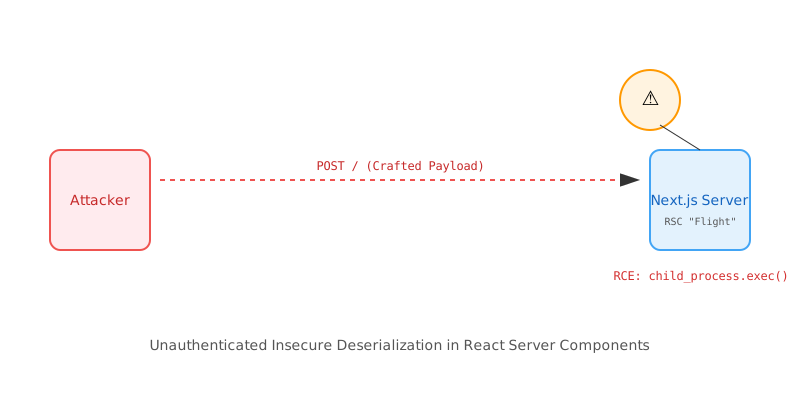
React2Shell is an insecure deserialization vulnerability within the "Flight" protocol used by React Server Components (RSC). It affects React 19.x and Next.js 15.x/16.x App Router implementations. (Official React Blog Post)
Attackers can exploit this by sending a single crafted HTTP POST request containing a malicious serialized payload. Because the server deserializes this payload without adequate validation, it can be tricked into executing arbitrary code (RCE) with the privileges of the Node.js process.
🚨 Industry Impact
"Within hours of the public disclosure... Amazon threat intelligence teams observed active exploitation attempts by multiple China state-nexus threat groups... This critical vulnerability... has a maximum CVSS score of 10.0."
"GTIG considers CVE-2025-55182 to be a critical-risk vulnerability... The flaw allows unauthenticated attackers to send a single HTTP request that executes arbitrary code."
Am I Vulnerable?
You are likely vulnerable if you are running Next.js App Router with default configurations on affected versions.
npm list react next react-server-dom-webpackAffected Versions
- Next.js: Versions 15.0.0 through 15.0.3, and 16.0.0-canary prior to patch.
- React: Versions 19.0.0, 19.1.0, 19.1.1, 19.2.0 (specifically
react-serverpackages).
Deep Inspection
For a more thorough check, you can run this script to identify if your node_modules contains the vulnerable react-server flight implementation.
#!/bin/bash
# React2Shell Vulnerability Checker

echo "Checking for CVE-2025-55182 (React2Shell)..."

if [ ! -f "package.json" ]; then
  echo "❌ Error: No package.json found. Run this in your project root."
  exit 1
fi

VULN_NEXT=$(npm list next --depth=0 2>/dev/null | grep "next@" | awk -F@ '{print $2}')
echo "Found Next.js version: $VULN_NEXT"

# Simple version check logic (Note: This is illustrative, always check vendor advisories)
if [[ "$VULN_NEXT" =~ ^15\.0\.[0-3] ]]; then
  echo "⚠️  CRITICAL: Your Next.js version ($VULN_NEXT) is likely VULNERABLE."
  echo "   Action: Upgrade to Next.js 15.0.4+ or 16.x latest immediately."
else
  echo "✅ Next.js version seems patched or unaffected (verify with specific patch notes)."
fi
Docker Environment Inspection
Containerized environments pose a unique risk: even if you update your source code, your production environment might still be running an older, cached Docker image. Since Next.js relies on React, inspecting the actual running container is crucial to ensure the deployed artifacts are patched.
Why check containers? Docker build layers often cache node_modules. If your package-lock.json hasn't changed significantly, a rebuild might still use cached, vulnerable dependencies.
#!/bin/bash
# Scan running Docker containers for vulnerable Next.js versions

echo "🐳 Scanning running Docker containers for Next.js vulnerabilities..."

# Get all running container IDs
CONTAINERS=$(docker ps -q)

if [ -z "$CONTAINERS" ]; then
  echo "No running containers found."
  exit 0
fi

for CONTAINER in $CONTAINERS; do
  NAME=$(docker inspect --format '{{.Name}}' $CONTAINER | sed 's/\///')
  echo "---------------------------------------------------"
  echo "Checking container: $NAME ($CONTAINER)"

  # Method 1: Try npm list (if npm is installed in container)
  VERSION=$(docker exec $CONTAINER npm list next --depth=0 2>/dev/null | grep "next@" | awk -F@ '{print $2}')

  # Method 2: Fallback to reading package.json directly (common paths)
  if [ -z "$VERSION" ]; then
      VERSION=$(docker exec $CONTAINER cat /app/node_modules/next/package.json 2>/dev/null | grep '"version":' | head -n 1 | awk -F'"' '{print $4}')
  fi

  if [ -n "$VERSION" ]; then
      echo "Found Next.js version: $VERSION"
      if [[ "$VERSION" =~ ^15\.0\.[0-3] ]]; then
           echo "⚠️  VULNERABLE: Container is running a vulnerable version!"
      else
           echo "✅ Version seems safe (Verify against 15.0.4+)."
      fi
  else
      echo "❓ Could not detect Next.js version (Check paths manually)."
  fi
done
How to Fix
The only effective mitigation is to upgrade your dependencies immediately. WAF rules are bypassable and should not be relied upon as a primary defense.
1Update Next.js & React
npm install next@latest react@latest react-dom@latestpnpm update next react react-dom --latest2Verify Installation
package.json reflects the patched versions."dependencies": {
"next": "^15.1.0", // Must be >= 15.0.4
"react": "^19.0.0",
"react-dom": "^19.0.0"
{
3Redeploy
You must rebuild and redeploy your application for the changes to take effect.
Note for Enterprise / Self-Hosted
If you cannot upgrade immediately, you must block all POST requests to your application that contain RSC payload headers (RSC, Next-Router-State-Tree, Next-Url) at your load balancer or firewall level, though this will likely break application functionality. Patching is the only safe option.